








Insert, don’t retime
Your original frames stay as they are. New frames are made only where the generator skipped one, so motion is fixed without the soft, smeared look of full-clip interpolation.
For Seedance, Kling, Veo & more
Frame-accurate stutter repair for AI video.
Generators build a clip in chunks and drop frames where the chunks join, so motion hitches on a steady beat. Pulse Fixer finds each skipped frame, rebuilds only what is missing, and shows you the proof.
Repairs output from
See the difference
Left of the line: straight out of the generator. Right: after Pulse Fixer. Same clip, same speed — only the missing frames are back.
Jump close-up · real Seedance clip
A drone shot straight from the generator: 10 seconds at 24 fps. Where two chunks join, a frame was never generated, so the camera jumps twice as far as it should. Watch both at real speed — the left one hitches, the right one just flows.
The app
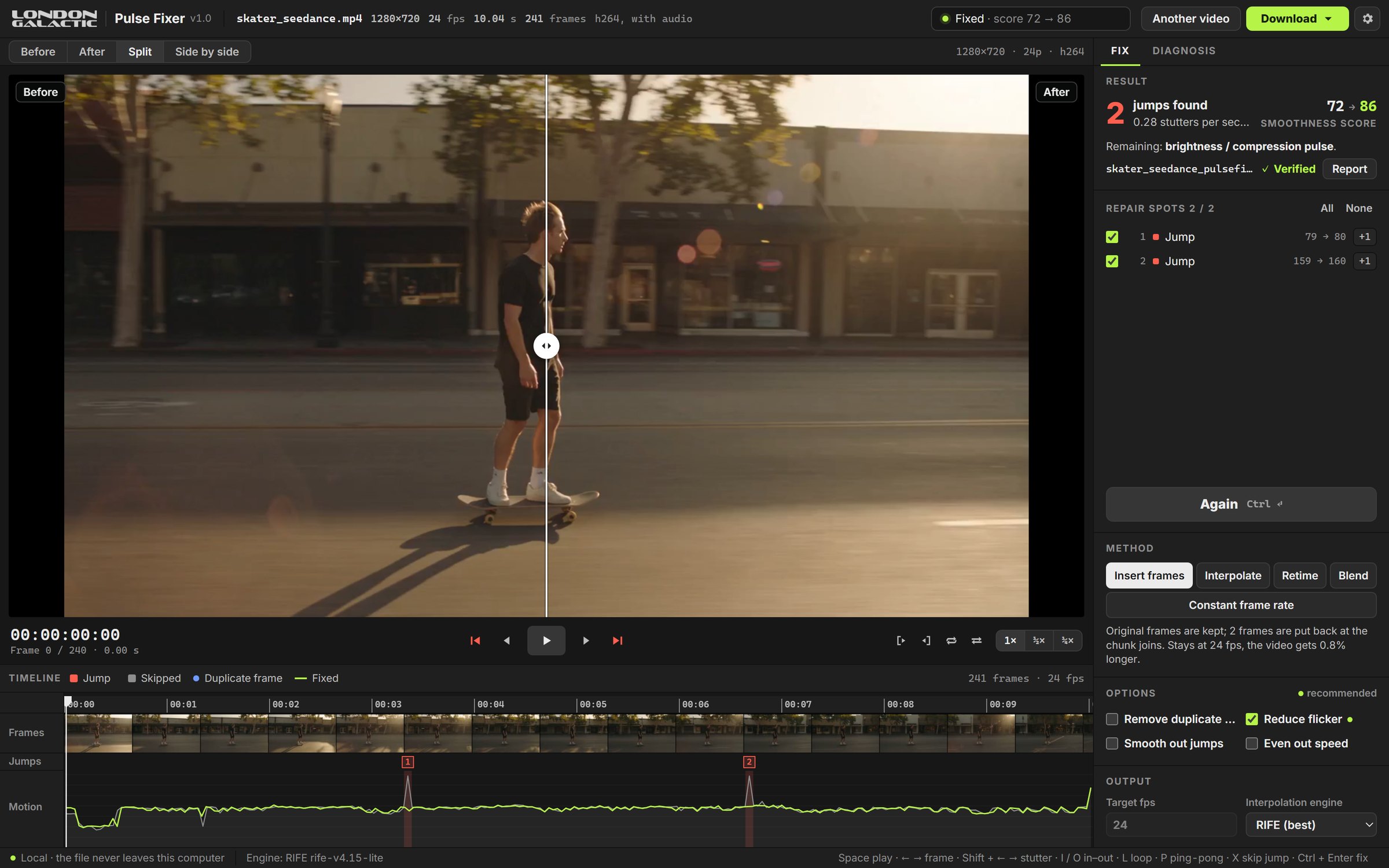
A monitor with Split and Side by side, a timeline with every jump marked, and an inspector that shows what was found, what was fixed and how it was checked.
The finding
Measure the camera motion frame by frame and the pattern jumps out: smooth, smooth, smooth — then a step twice as big, at every chunk join. A frame was never generated. Frame-rate conversion and generic smoothing can’t fix that; they don’t know where the hole is.
Pulse Fixer measures pan, zoom and rotation on every frame, finds each join and works out how much motion is missing there — one whole frame, or part of one.
How it works
Drop a clip. In seconds you get a smoothness score, every skipped frame on a timeline, duplicates, flicker and scene cuts — and the settings that suit this clip.
Step through the jumps frame by frame. Keep the ones you want repaired, skip the ones you don’t. A skipped jump is left exactly as it was.
Only the missing frames are generated, with RIFE on your GPU. The result is decoded again and checked frame for frame, and a repair report lists every frame that was added.
Plugin for Adobe® Premiere® Pro
Select a clip, click Analyze, then Fix. Pulse Fixer repairs exactly the part of the clip you used, saves the result next to your project, imports it into a Pulse Fixer bin and lays it on the track above — the original stays below for comparison.
Built for finishing
Your original frames stay as they are. New frames are made only where the generator skipped one, so motion is fixed without the soft, smeared look of full-clip interpolation.
Not every join loses a whole frame. Pulse Fixer measures the step and re-spaces the frames around it, so motion is not slowed down where only part of a frame is missing.
Cuts are found and kept. Interpolation, speed evening and deflicker run per shot, so one shot never bleeds into the next.
Still see a hitch in the result? Hover it on the timeline and fix that one spot on the lossless master — nothing else is touched.
Every output is decoded again: frame count, size and frame rate checked. The report lists which frame went between which source frames — something to hand to a client.
GPUs occasionally return a corrupted in-between. Each one is compared with its neighbours and remade on the CPU if needed.
Split wipe, side by side, frame stepping, In/Out loop and ping-pong at ½× or ¼× — check the fix the way you check a grade.
The fix renders once to a lossless master. Export H.264, H.265 or ProRes from it any time, with no generation loss.
Everything runs on your computer. Your footage is never uploaded and there is no account — safe for client work under NDA. Only your licence key is checked online.
Why not just interpolate?
| Frame-rate conversion / optical flow | Pulse Fixer | |
|---|---|---|
| Finds where frames are missing | No — treats every frame the same | Every chunk join, with the size of each gap |
| Original frames | Often all re-generated | Kept; only the gaps are filled |
| Partial skips | — | Re-spaced from measured motion |
| Scene cuts | Morphing across the cut | Detected and preserved |
| Review before fixing | — | Keep or skip each jump |
| Proof of the fix | — | Before/after score, verification, repair report |
| Inside Premiere Pro | Varies | Plugin, result placed on the timeline |
Honest limits
We’d rather you know before you try it.
Pricing
A one-time licence with all 1.x updates — no subscription. Prices include VAT where it applies.
$0
Try every feature on your own clips. No card, no account.
Repair
Workflow
$29/ licence
For one editor. Pay once, keep it — all 1.x updates included.
Repair
Workflow
$69/ licence
For editors who work in Premiere Pro. Pay once — all 1.x updates included.
Repair
Workflow
14-day money-back guarantee. Payments are processed by our reseller, Lemon Squeezy, who handles tax and invoicing. See Refund policy and Terms.
Free demo
Leave your email and we’ll send you the Windows demo: every feature, five full-quality exports without watermark. Early users get a launch discount on the full version.
FAQ
No. The clip stays at its frame rate. Pulse Fixer adds the frames the generator skipped, so the motion between existing frames becomes even. Converting the frame rate would leave the gaps in place and soften every frame.
Any that build video in chunks and lose frames at the joins — we see it most in Seedance, Kling and Veo output. It also finds duplicates, flicker and variable frame rate in any clip.
No. Analysis and repair run entirely on your computer, and your clips never leave it. There is no account. The only time the app goes online is to activate and occasionally check your licence key.
Windows 10 or 11 (64-bit). A GPU makes it much faster (NVIDIA, AMD or Intel via Vulkan); without one it falls back to the CPU. The plugin needs Premiere Pro 25.6 or later.
With Insert frames the clip gets slightly longer — by exactly the frames that were missing, usually a few per 10 seconds. The Premiere Pro plugin places it on the track above, so your edit is not shifted.
Yes. Your output is yours. Pulse Fixer uses RIFE (MIT licence) and FFmpeg; third-party notices ship with the app.
macOS is in preparation. Resolve and After Effects support are on the roadmap — tell us which you need when you get the demo.